
Speaker Preparation
Information in this section of the handbook is for speakers specifically. These guidelines include instructions on how to prepare your presentation.
It is important that you read and understand these guidelines while preparing your presentation.
GRX26 is being held as a fully in-person conference. Therefore, all speakers are required to attend in-person to present their work.
Presentation - slide deck
Please ensure your presentation is prepared in the 16:9 ratio (wide screen).
DO NOT prepare your presentation in 4:3 ratio – this will not show properly for your presentation.
Note: If you have any disclosures related to your presentation – please ensure that you include a disclosure slide at the start of your presentation.
Presentation length
Please refer to your notification letter for your presentation length.
Presentation times will be strictly enforced by moderators/chairpersons.
PowerPoint files
All users of Mac (Apple) hardware need to ensure before they leave home that the files are compatible with PC hardware. It is expected that presenters will use Microsoft.
Other compatible software includes:
- Office programs (Word, PowerPoint, Excel, Access, Outlook)
- Windows media player
- Quick time
- WinZip
- Adobe Acrobat
- Flash Player
Please let us know immediately if you use a Mac (Apple) system.
Movies and sound files
If you have movies or sound files in the PowerPoint presentation please embed them and test that they work correctly in presentation mode.
To ensure a complete and effective presentation every time here’s what to do:
- Create a folder for your presentation
- Place or copy every file that is used in the presentation in this folder. This will include all pictures, movies, sounds or any files that are used in the presentation
- Now re-create any links so that they access this presentation folder (insert, movies and sounds, from file). Remember to resave the presentation
- Another advantage of this approach is that you have access to the original files such as video clips etc in the event of PowerPoint problems
Loading your presentation - MAIN PROGRAM
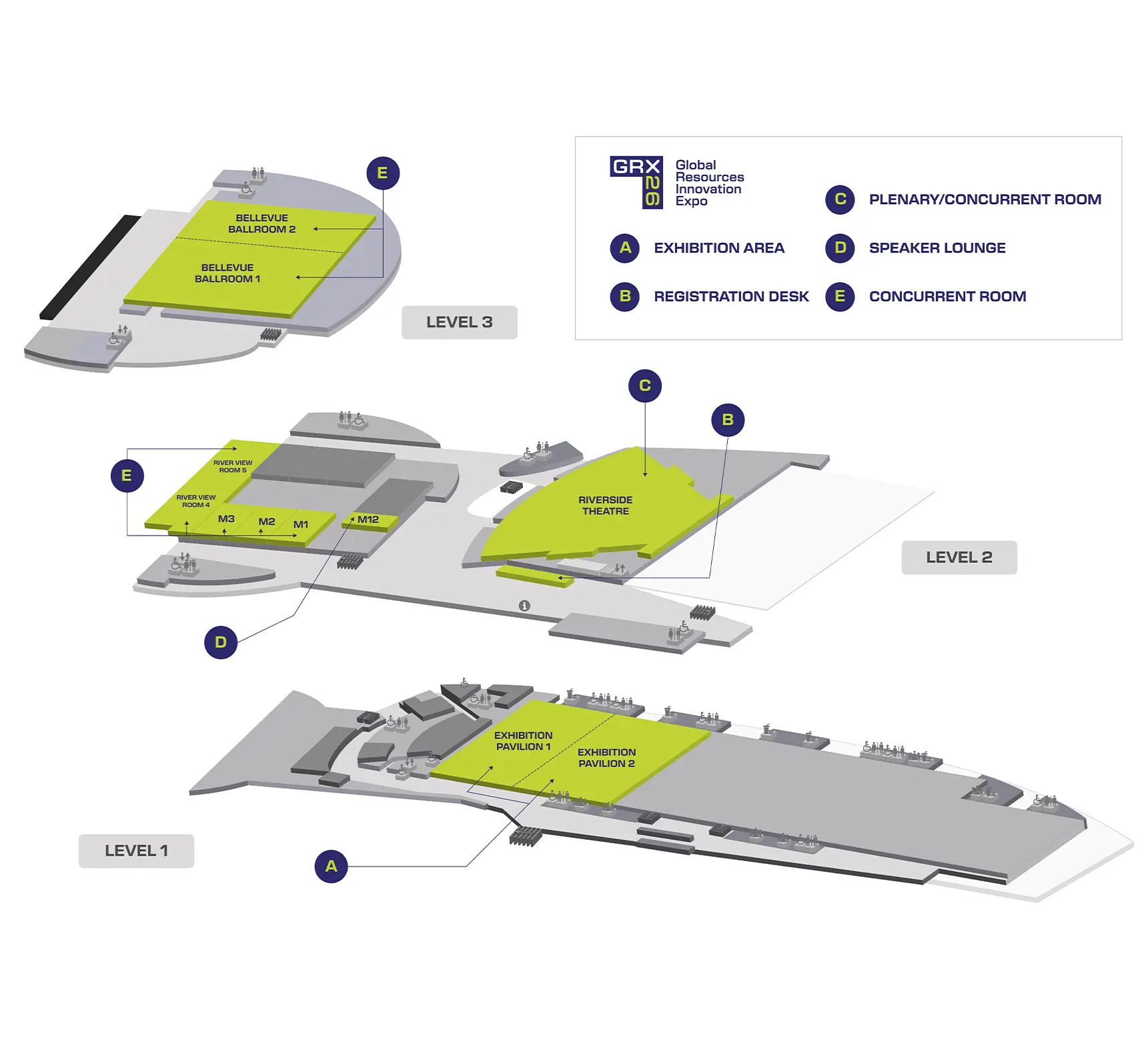
The speaker preparation room will be located in Meeting Room 12 (M12) on level two.
All speakers are required to pre-load their presentations at the speakers preparation room at least 3 hours prior to their session commencing.
This is to ensure that your presentation is loaded and working correctly.
All presentations will be networked to the presentation rooms; therefore, you need to ensure your presentation is loaded prior to your speaking time.
It will not be possible to use your own laptop or USB for your presentation.
Loading your presentation - TUE WORKSHOPS | INDUSTRY PROGRAM
As you are participating in the Tuesday Workshops | Industry program there is no requirement to load your presentation within the speaker preparation room.
Instead we ask that you load your presentation directly with the AV technician in your assigned session room.
It is not possible to use your own laptop or to load your presentation within your session room unless previously arranged.
Session information
Your presentation will be given live, in-person.
Questions from the audience will be moderated as per below depending on the type of session you are presenting within:
Plenary session
Questions from the audience will be collected by the APP and distributed verbally by the moderator/chairperson to the speakers/audience.
Concurrent session
Questions will asked verbally by audience members via standing microphones situated within the audience in the session room.
You are required to be available for the duration of your session and to participate in the live Q&A.
Within your session room there will be the following audio-visual items:
- Lectern and microphone
- Foldback monitor to view presenter notes
- Clicker or mouse to advance slides
- Speaker will have option of a headset microphone, handheld microphone or lectern microphone
Speaker Preparation Room
The speaker preparation room will be located in Meeting Room 12 (M12) on level two.
All speakers are required to pre-load their presentations at the speakers preparation room at least 3 hours prior to their session commencing.
If you are presenting in the first session of the day, you MUST check in the day prior to your presentation.
All presentations will be networked to the presentation rooms; therefore, you need to ensure your presentation is loaded prior to your speaking time.
Speaker preparation opening times
Tuesday 5 May: 0900 – 1700 hours
Wednesday 6 May: 0700 – 1700 hours
Thursday 7 May: 0800 – 1500 hours
What to do on the day of presentation
Please follow the below checklist to ensure you are ready for your presentation
- Make sure you have loaded your presentation in the speakers preparation room
- Be in your assigned session room at least 15 minutes prior to your session commencing
- Ensure that you are seated at the front of the room (front row near lectern or at head table depending on number of speakers in your session)